The Problem
By end of day, reconstructing an hour-by-hour account of calls, meetings, reports, and site visits from memory was its own small chore — and an inaccurate one. I wanted an easier way to see where time actually went, tracked visually as the day happened, not rebuilt from memory afterward.
The Approach
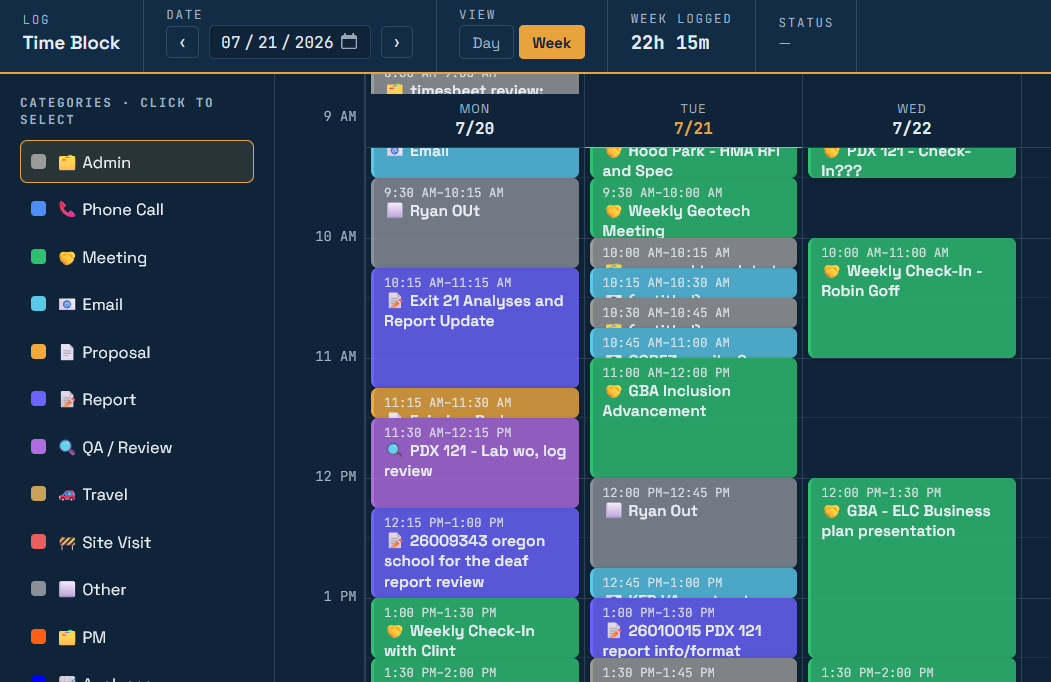
A single-user, self-hosted web app: a day/week grid where I drag to block out time against a set of categories (Admin, Phone Call, Meeting, Proposal, Report, Site Visit, and more), each color-coded. A static HTML/JS front end backed by a small PHP script and a JSON file, gated behind a password login. Blocks are logged as the day happens, not reconstructed at the end of it. Any day or week exports straight to CSV.
The week view — color-coded blocks by category, with hours logged for the week tallied at the top.
The Result
No account, no subscription, no third party holding the data — and no more end-of-day guesswork. The day's record is already built by the time the day is over; exporting it is one click.